It’s always fun upgrading your OS, even when it’s something “small”.
I fondly remember my Windows 98 Second Edition upgrade as a smooth upgrade.
Not too much changed, just some added bells and whistles, but it was worth the time,
After reading about the series of small changes to Windows 8.1 I thought it would be a worthy endeavor. Improved customization of the Start Screen, right click on the Start button for quick access to system items, tweaks to the native apps (which I loved before these changes), etc.
So Oct. 17th hits and I start the upgrade late in the day.
NOTE: This post turned out longer than I thought, click here to skip to the fixes
I had been working and wasn’t able to start earlier or during work.
I figured it would be a quick and small update since they pushed it through the Windows Store. Something along the lines of a service pack.
Oh was I in for a surprise.
Nearly 3.75 GIGS later I start the process the next day, again.
I had gotten another late start due to work, and attempted my first install.
It would have started sooner but I’m currently dual-booting my system with Ubuntu because I want to run a Xen Hypervisor gaming rig. Don’t ask why, because I can.
Anyway, I get home and reboot to go into Windows, it boots quickly like it always has. I get to my login screen, type in my password… and WHAM, error 0xc1900191 – 0x20017.
 Crap.
Crap.
This is NOT how I want to start this!
A little Google-fu shows nothing consistent, mostly unplug everything and try again. So I do this, several times. Nothing, same error.
I try another suggestion of updating my graphics drivers, but I had already upgraded before this, so I just REMOVED them altogether, can’t get stuck on something that’s not there! Nope, nothing, drat.
I did stumble upon 1 post that said something odd. It mentioned that update never took because something with their USB ports initializing improperly stopped the EULA page from showing after the reboot.
I didn’t even get that far, so on a hunch I figured this may have been a little more than a service pack upgrade, paired with the MASSIVE download. And with that hunch I decided to over-write my MBR from GRUB2 to the default Windows 8 bootloader.
SUCCESS!
The next series of screens appear to be a full blown installation of Windows. I’m not going to lie and say it didn’t make me sweat a little. A little worried about a “refreshing” install.
After 2 or so automatic reboots something odd happened, or should I say didn’t.
My PC just hung there, HD light solid red, but no noise.
A little odd but these things happen, so I let it sit. And sit, and sit.
During this time I had a flashback of how this looked like Windows does when you use the SATA drivers provided by AMD sometimes, your PC just sits for about 45 minutes, HD LED solid, nothing happens, then it springs to life.
So I thought maybe it just tried to install those drivers since WindowsUpdate has been pushing them, I’ll just wait it out.
90 minutes, nothing.
I’ve had enough, I press the reset button, and it attempts to start the installation again.
This looks promising.
Stalled, again.
Ug.
Reset again, this time it tells me it’s restoring my previous installation.
This time I’m nailed with a DIFFERENT error ( 0xc1900101 – 0x40017 ).
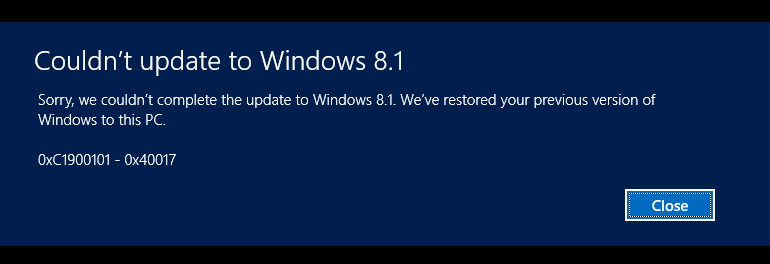
Crap.
Seriously?
Okay, I’ll just remove the SATA drivers I had downloaded a while ago, maybe it’s pulling them for there.
Yanked, and restarted the install…
Stalled.
Rebooted twice, rolled back.
Okay, now I’ll yank ALL the AMD SATA drivers.
So I dig into C:WindowsInf and remove 2 OEM#.INF’s and one amdsata.inf.
Still stalled.
ARG!
Okay, so how do I get past this snag? I KNOW it has to do with SATA drivers! And it must be providing it’s own if they keep coming back.
Hm, SATA… IDE…
I know! I’ll roll my drives back into IDE mode!
I jump into the BIOS and switch my SATA drives from AHCI to IDE.
Restart install…
EULA pops up! HOORAY!
I go through all the prompts, logging in, and confirming my PC again (weird, but I didn’t care at this point).
I get to my Start Screen, joy!
I tinker around for a minute with re-sizing some of my tiles and get to switching back my drives to AHCI mode.
Back into the registry I go and change some settings for the AHCI controller and reboot.
BSOD.
Son of a…
Switching back and forth, Googling each time reveals nothing. Constantly tinkering with registry settings.
Nice thing about my motherboard is the ability to have 2 SATA posts in a different mode than the other 4…
So last 2 in IDE mode, and first 4, including my boot drive, in AHCI mode.
Boots at last!
Switching the first 4 so now I’m in full AHCI mode.
And I am FINALLY in Windows 8.1 at full speed!
All this trouble, and yet almost nothing was Microsoft’s fault, just please kill that AMD SATA driver that hates my motherboard…
Using Standard AHCI driver and happy
TL;DR version:
0xC1900101 – 0x20017 error caused by third party (GRUB2) boot loader
0xC1900101 – 0x40017 error caused by bad AMD drivers (built-in version, not the downloaded ones), revert to IDE mode, install 8.1, then change back after changing “storahci” settings in the registry. For some reason it hated my motherboard and I had to have both AHCI and IDE modes on during this transition. DID NOT TINKER WITH THE DEDICATED IDE CONTROLLER, REMAINED DISABLED THE WHOLE TIME.
 CWtheNerd - Life inside of technology
Hi, could you provide more info how you fix the 0xc1900191 – 0x20017 error. Thanks.
LikeLike
Wow, my bad, I never got notified about your comment! I can try and help, use the contact form to reach me.
LikeLike